🐦 Twitter Post Details

Viewing enriched Twitter post

@llama_index

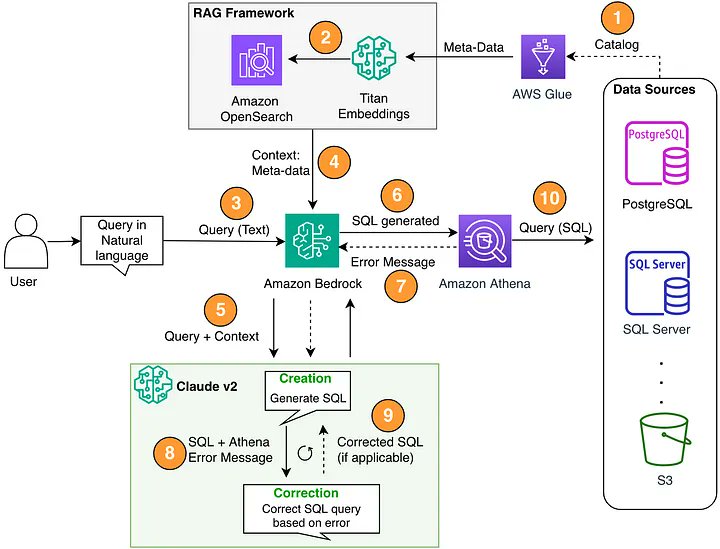
Reliable Text-to-SQL over 500 Tables 🔥🔎 Most text-to-SQL tutorials are easy and operate over “trivial” examples like 2-3 tables. This tutorial by @kiennt_ is one of the best we’ve seen in showing you how to construct a SQL agent that can operate over a large and complex data model (500+ tables, relationships between them). Here are some of the key steps: 1. Iterate through each table and extract a structured schema with LLM-generated summaries 2. Use hierarchical chunking and indexing to help retrieve an initial set of relevant tables 3. Use graphRAG techniques to provide tables related to the existing tables 4. Feed relevant and related set of tables to text-to-SQL prompt to generate the query https://t.co/pSYc3NWa38
Media 1

📊 Media Metadata

{
  "data": [
    {
      "id": "",
      "type": "photo",
      "url": null,
      "media_url": "https://pbs.twimg.com/media/Ga27U0ma4AA-rmi.jpg",
      "media_url_https": null,
      "display_url": null,
      "expanded_url": null
    }
  ],
  "score": 1.0,
  "scored_at": "2025-08-09T13:46:07.549325",
  "import_source": "network_archive_import",
  "media": [
    {
      "type": "photo",
      "url": "https://crmoxkoizveukayfjuyo.supabase.co/storage/v1/object/public/media/posts/1850340995482952190/media_0.jpg?",
      "filename": "media_0.jpg",
      "original_url": "https://pbs.twimg.com/media/Ga27U0ma4AA-rmi.jpg"
    }
  ],
  "storage_migrated": true
}

🔧 Raw API Response

{
  "user": {
    "created_at": "2022-12-18T00:52:44.000Z",
    "default_profile_image": false,
    "description": "Build LLM agents over your data\n\nGithub: https://t.co/HC19j7vMwc\nDocs: https://t.co/QInqg2zksh\nDiscord: https://t.co/3ktq3zzYII",
    "fast_followers_count": 0,
    "favourites_count": 1261,
    "followers_count": 82611,
    "friends_count": 26,
    "has_custom_timelines": false,
    "is_translator": false,
    "listed_count": 1366,
    "location": "",
    "media_count": 1375,
    "name": "LlamaIndex 🦙",
    "normal_followers_count": 82611,
    "possibly_sensitive": false,
    "profile_banner_url": "https://pbs.twimg.com/profile_banners/1604278358296055808/1696908553",
    "profile_image_url_https": "https://pbs.twimg.com/profile_images/1623505166996742144/n-PNQGgd_normal.jpg",
    "screen_name": "llama_index",
    "statuses_count": 2997,
    "translator_type": "none",
    "url": "https://t.co/epzefqQqZx",
    "verified": true,
    "withheld_in_countries": [],
    "id_str": "1604278358296055808"
  },
  "id": "1850340995482952190",
  "conversation_id": "1850340995482952190",
  "full_text": "Reliable Text-to-SQL over 500 Tables 🔥🔎\n\nMost text-to-SQL tutorials are easy and operate over “trivial” examples like 2-3 tables. This tutorial by @kiennt_ is one of the best we’ve seen in showing you how to construct a SQL agent that can operate over a large and complex data model (500+ tables, relationships between them).\n\nHere are some of the key steps:\n1. Iterate through each table and extract a structured schema with LLM-generated summaries\n2. Use hierarchical chunking and indexing to help retrieve an initial set of relevant tables\n3. Use graphRAG techniques to provide tables related to the existing tables\n4. Feed relevant and related set of tables to text-to-SQL prompt to generate the query\n\nhttps://t.co/pSYc3NWa38",
  "reply_count": 7,
  "retweet_count": 117,
  "favorite_count": 498,
  "hashtags": [],
  "symbols": [],
  "user_mentions": [
    {
      "id_str": "1578958663",
      "name": "Ryan Nguyen",
      "screen_name": "kiennt_",
      "profile": "https://twitter.com/kiennt_"
    }
  ],
  "urls": [],
  "media": [
    {
      "media_url": "https://pbs.twimg.com/media/Ga27U0ma4AA-rmi.jpg",
      "type": "photo"
    }
  ],
  "url": "https://twitter.com/llama_index/status/1850340995482952190",
  "created_at": "2024-10-27T00:57:25.000Z",
  "#sort_index": "1850340995482952190",
  "view_count": 73362,
  "quote_count": 5,
  "is_quote_tweet": false,
  "is_retweet": false,
  "is_pinned": false,
  "is_truncated": true,
  "startUrl": "https://x.com/llama_index/status/1850340995482952190"
}