@isaac_flath
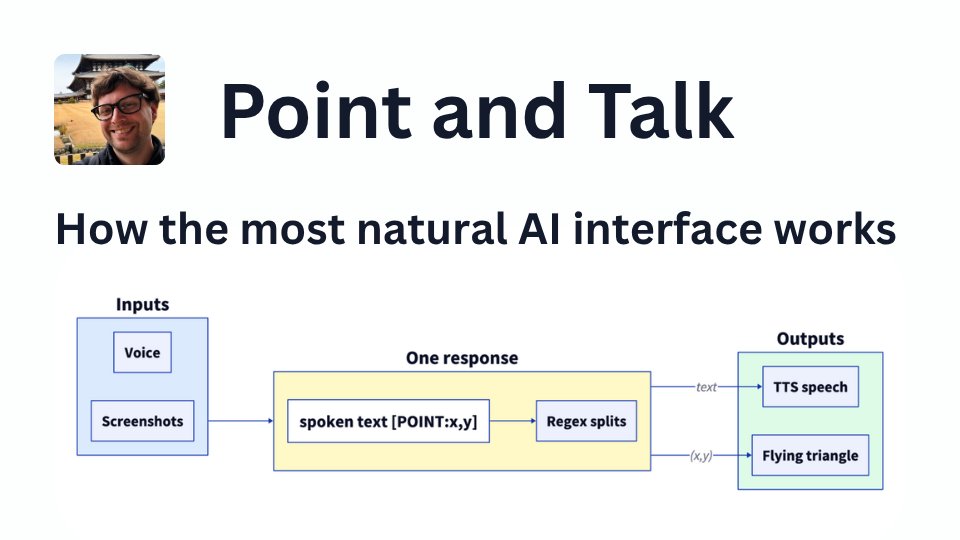
I will take concepts from @heyclicky 's Point and Talk interface by @FarzaTV to improve my own work. So I studied the OSS prototype of it to understand how it works. Here's the highlights: 𝐖𝐡𝐲 𝐩𝐨𝐢𝐧𝐭 𝐚𝐧𝐝 𝐭𝐚𝐥𝐤: The chat box isn't a great interface for an LLM. A blue triangle landing on a button is a more natural way to say "click here" than "in the top right, between the search field and the avatar, you'll see a small icon." 𝐓𝐡𝐞 𝐭𝐫𝐢𝐚𝐧𝐠𝐥𝐞 𝐚𝐧𝐝 𝐭𝐡𝐞 𝐨𝐯𝐞𝐫𝐥𝐚𝐲: Clicky create an invisible full screen overlay on each window and draws the flying blue triangle on that. Clicks fall through the window, and this window doesn't know what apps are behind it. 𝐎𝐧𝐞 𝐭𝐚𝐠, 𝐨𝐧𝐞 𝐫𝐞𝐠𝐞𝐱: Clicky uses regex and prompting to get coordinates from the model. I expected some structured output tool calling, but it simply asks the model to put coordinates at the end 𝐖𝐡𝐚𝐭 𝐂𝐥𝐚𝐮𝐝𝐞 𝐬𝐞𝐞𝐬: Clicky takes one screenshot per monitor (resized and at lower quality) which lets it see the screen and read UI text. It filters out it's own window so it sees what the user sees, minus Clicky 𝐂𝐨𝐨𝐫𝐝𝐢𝐧𝐚𝐭𝐞 𝐦𝐚𝐭𝐡: Claude returns coordinates in the screenshot's pixel space. Getting the buddy to that spot on the display takes multiple transforms to account for differing coordinate spaces, sizes, multiple monitors, and different coordinate systems in different places. Check out the post for full details: https://t.co/PiKmzraGuk Or try the Clicky product. It's more stable, spawns agents, got google integrations, and more stuff that the OSS prototype doesn't: https://t.co/Z5sT0qe366