@tetsuoai
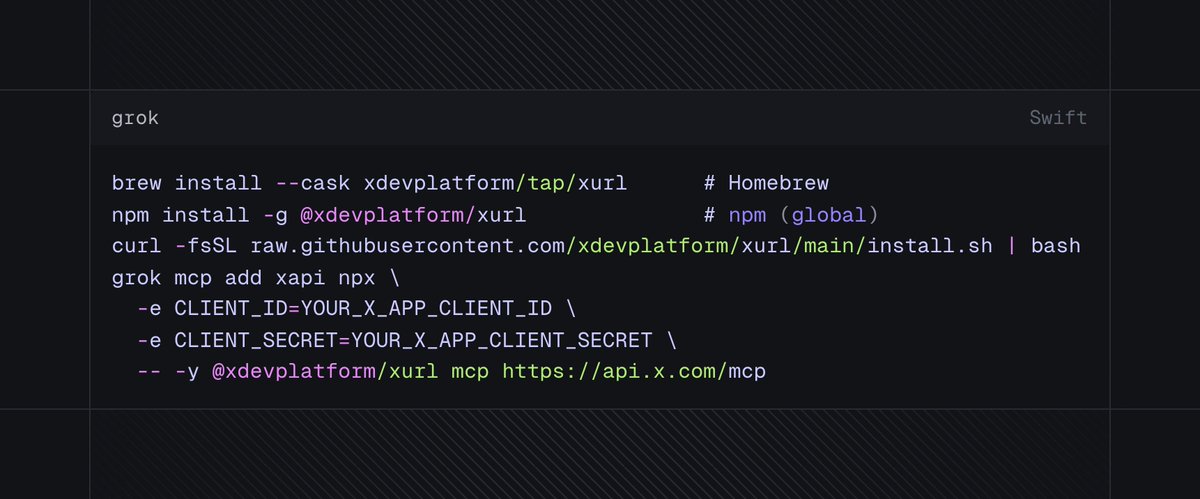
X just launched hosted MCP servers so AI tools can connect directly to the platform. Connect Grok Build, Cursor, Claude, VS Code, or any MCP client to two official servers: • X MCP (httpx://api.x.com/mcp) search posts, manage bookmarks, fetch trends/news, and draft/publish Articles with your account permissions. • Docs MCP (httpx://docs.x.com/mcp) instantly search and read X API docs inside your workflow. Quick Grok setup: X Developer Portal: httpx://developer.x.com/ Before you begin. Create an X app in the X Developer Portal with OAuth 2.0 enabled. Register the redirect URI https://localhost:8080/callback on the app. Copy your CLIENT_ID and CLIENT_SECRET. Replace YOUR_X_APP_CLIENT_ID and YOUR_X_APP_CLIENT_SECRET in the attached image with these. Run the commands from: [Image attached at bottom] Then verify: grok mcp doctor xapi grok mcp list One-time browser login on first run. Tokens cached and auto-refreshed locally after. Big unlock for agentic systems that need live X data.