@pol_avec
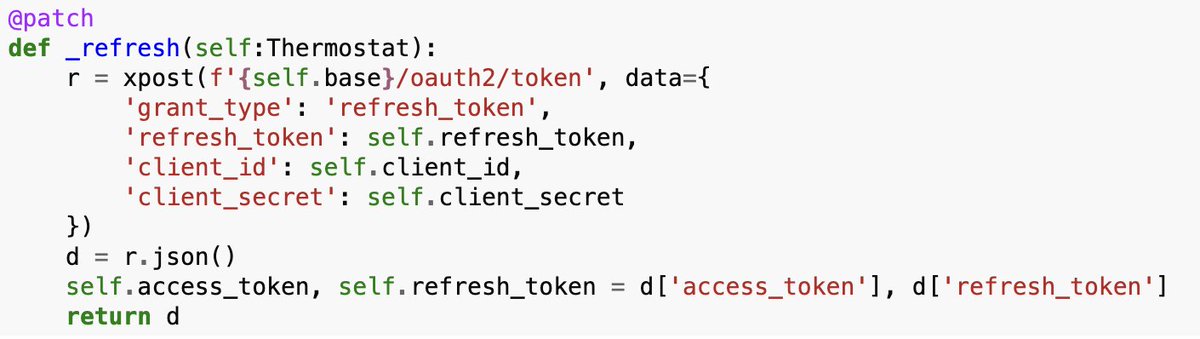
Why you should write the code to use your Thermostat Yesterday, I tried following @karpathy 's lead and use CC to interface with my thermostat. The experience wasn't great for me. Today I tried the opposite, I built it step-by-step almost completely manually using @answerdotai 's SolveIT. It was great. I spent a much longer time, say maybe 4-5h. But it was worth it, even though I have a perfectly fine app already to handle the temperature (in other words, I might not reuse the code again). So, was worth it? Yes, why? Because there were a myriad small decisions and lessons learned throughout the process. Those are usually small enough and that don't feel significant but they do compound in the end. They make your tools much sharper. If you look at the final package I published to pypi you won't see that, and it looks like code an LLM could one-shot, the LLM could definitely NOT make you learn during the process. This is more or less how it went: Well, I started getting SolveIT to read the docs for me and list which endpoints does the Thermostat API have. Unfortunately, their docs require JS to render 😅. I took this chance to have a look a Zyte service to give SolveIT a tool to read the docs. With that setup I got a list of all endpoints for the API. I followed the instructions to get the API keys & tokens. Gave it a try, it worked, I went away, and when I came back the token had expired. No problem, solveIT created a super short _refresh method as part of the class. Next step, create the basic "Home Status" info endpoint. But call _refresh first to make sure we have an updated token... I thought we would have to do this for all endpoints, so let's actually create a `_request` that does this for us already. That way the methods simply look like this: At this point I took the chance to practice using dialoghelper. I had created two endpoints following a clear format: first markdown header, @ patch method into the class, try it out and display results. Because the structure was super clear, and the full list of endpoints available already, SolveIT could add each one of the endpoints in the exact format I liked, fast & straightforward. At this point, when I finished, it felt silly, why did I spend time doing this at all, it was done so fast! but it was fast mostly because everything was perfectly set up. I was reminded of @johnowhitaker said during the course: " ... using SolveIT, we spend most of our time sharpening our tools..." and that felt very true, once your tools are sharp and set up for the task at hand, the task was super fast to finish. Thanks to all this I learned things I wouldn't otherwise: - using Zyte to scrape (& having it ready to reuse as an LLM tool) - best way to design this API (I decided to name the methods exactly like the endpoints to avoid cognitive overload) - how easy it is to actually control my thermostat, and having a package to quickly interface with it - got better a publishing w/ nbdev - learned about _proc folder The API point was an important one, I tried many different ways to structure the endpoint calls, for example saving the home_id into the class, or using the first one by default, etc... The time in-between coding sessions, I could feel my brain in the background considering different approaches. I ended settling on mimicking the endpoints as close as possible, and letting the user built on top. I feel like a better engineer & API designer as a result of this. This won't happen if CC creates everything for you. There's the expression "Death by a thousand paper cuts" which describes how numerous small, seemingly insignificant problems accumulate over time to cause major failure The opposite happens with this approach: countless small decisions and lessons that felt insignificant on their own, but compounded into something valuable. @jeremyphoward often says to treat everything as a learning opportunity, and this definitely feels like it.